Blog · Trends · Oct 6, 2026 · 3 min read
Hoco sign generator: preview the punny proposal sign first
How to design a punny homecoming proposal sign with their name on it using Tanvo's hoco sign generator, which looks to pick, and tips for clean lettering.
What the trend is
Asking someone to homecoming has become an event in itself. The classic move is a hand-made poster with a pun on it, often paired with a prop: a pizza box that says the question is cheesy, sour candy, a volleyball, a pair of cleats. The sign is the photo everyone posts afterward.
The Hoco Sign Generator on Tanvo lets you preview the whole sign, with their name on it, before you buy the poster board or spend an evening with glitter glue.
Why it works
A good hoco sign is personal and a little corny on purpose. The pun connects to something the other person loves, like their sport, their favorite snack or their band, and the name makes it unmistakably for them. The hard part is design: fitting the words, choosing colors and arranging the props. Seeing a finished version first makes the real one faster to build and better looking.
The looks
There are six looks, each a different pun and prop:
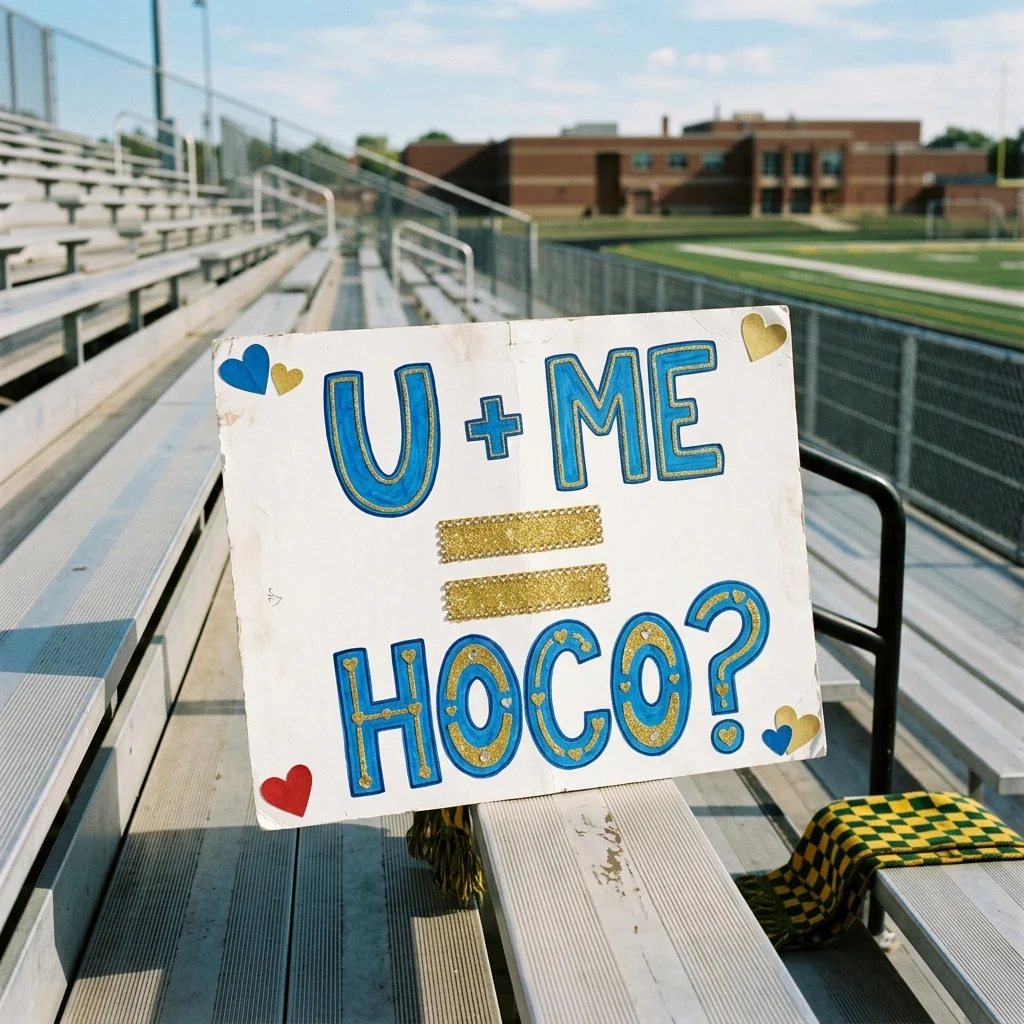
- U + ME = HOCO?: the classic equation sign.
- Cheesy pizza box: the pizza-box pun.
- Volleyball set: for a volleyball player.
- Kick it: a soccer or football style pun.
- Glow sticks: bright and party themed.
- Sour candy: the candy pun.
How to make it on Tanvo
- Open the app. Go to Hoco Sign Generator.
- Pick a look from the list above. There's no photo to upload for this one: the sign is made from the look and your details.
- Make it yours (optional). The chips tailor the theme: Volleyball, Soccer, Football or Band. Add their name so it appears on the sign.
- Generate. The app runs on Nano Banana 2 and makes a 1K square image. The default costs 25 credits, and failed runs are refunded. GPT Image 2 and Qwen Image 3 are also available in the app.
Tips for a good result
Keep the words short. Signs work best with a short pun and a name. Long sentences get cramped on a poster and are harder for any image model to letter cleanly.
Check the spelling, especially the name. Read every word in the result before you copy it onto a real board. Unusual names are the most likely to come out wrong. If a letter is off, generate again.
Try Qwen Image 3 for text-heavy signs. If your sign has more words than usual, Qwen Image 3 is built for readable text and layout, and it's one of the models available in the app.
Match the look to the person.
- Not sure what they're into: U + ME = HOCO?
- Food lover: Cheesy pizza box or Sour candy.
- Athletes: Volleyball set or Kick it, plus the matching sport chip.
- Band kids: the Band chip.
- A night-time ask: Glow sticks.
Use the preview as a plan. Note where the big words sit, which colors stand out and where the props go. Sketch the layout lightly in pencil on the real board before you paint or glue anything.
FAQ
Can it put their actual name on the sign?
Yes. Add the name when you make the sign and it's written into the design. Short names come out cleanest, so if they go by a nickname, consider using it.
Is the text always spelled right?
Not always. Image models can still slip on lettering, especially with long or unusual words. Check every word, and generate again if something is off. Qwen Image 3, available in the app, is built for readable text.
Can I use it as the actual sign?
You can print it, but most people use it as a design to copy onto a real poster board, which shows the effort that makes a hoco ask special. A 1K image is fine for planning and for sharing on a phone.
What about a prom sign?
The looks are written for homecoming, but the same approach works: keep it short, make it personal, and check the spelling.
Ready to try it? Open Hoco Sign Generator.